
Bookingkalender til 10Web
Add Bookingmood booking calendars to your 10Web website
Add Bookingmood to your 10Web website so guests can check availability and book your rental without leaving your site. You set it up once, and every change you make in Bookingmood shows on your website automatically.
Create a widget
Create a widget in Bookingmood. Widgets explains how.
Click Embed and copy the Inline embed code. You need it in the next step.
Add the widget to 10Web
Open your site and click Edit.
Select the element where you want to add the widget and click the code icon.
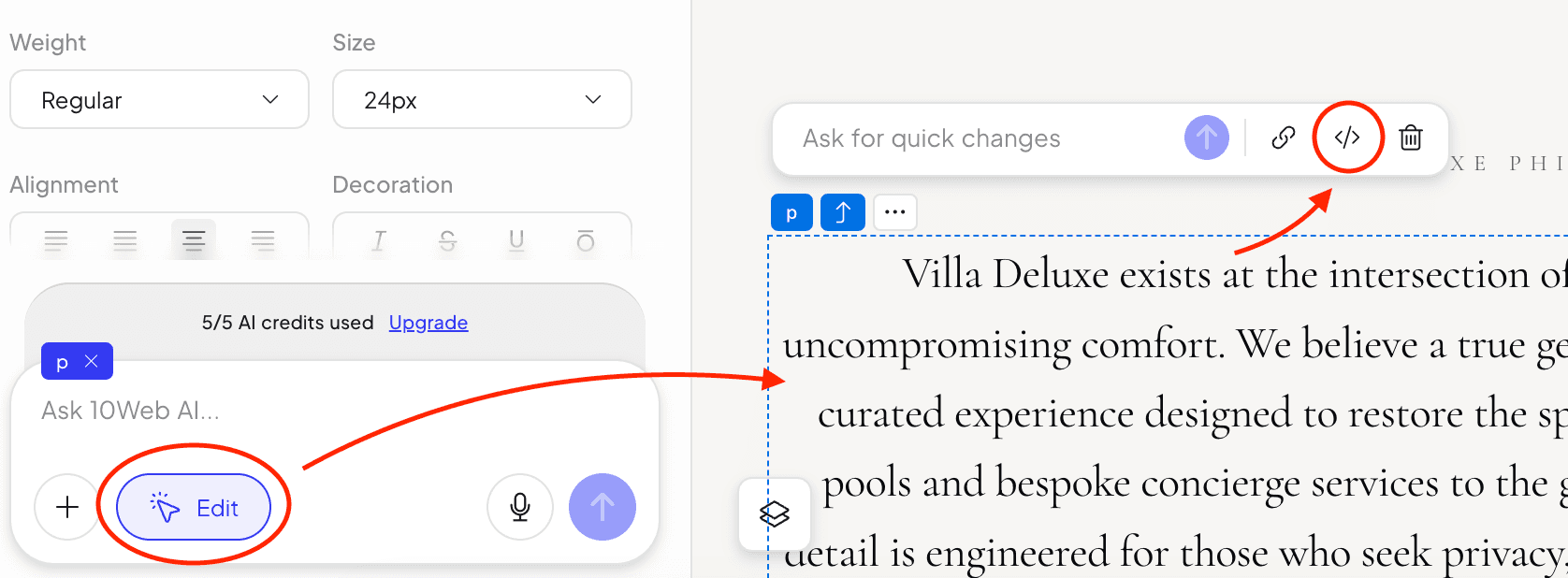
Go to the spot where you want the widget to appear and paste the embed code.
Save your changes.
That's it. Changes you make in Bookingmood now show on your website automatically.
Why use Bookingmood with 10Web?
10Web is an AI-powered WordPress website builder. It takes care of your website, and Bookingmood adds the booking system behind it. With Bookingmood you can:
Take direct bookings on your own website, without commission
Show real-time availability
Sync calendars with Airbnb, Booking.com and other channels
Set prices and availability rules
Take online payments
Manage all reservations from one dashboard
Match the widget to the colors and style of your website
It suits vacation rentals, holiday homes, villas, apartments, B&Bs, boutique hotels and glampings, and rental businesses such as boats, bikes and equipment.