Languages
Widgets are shown in the language you set under Language in the widget's settings. To show one widget in several languages, for example on each language version of your website, set the language in the embed code instead of creating a widget per language.
Open the widget under Channels.
Click Embed.
Turn on Include editable parameters in embed code.
Copy the code and change
locale=en-USto the language of the page.
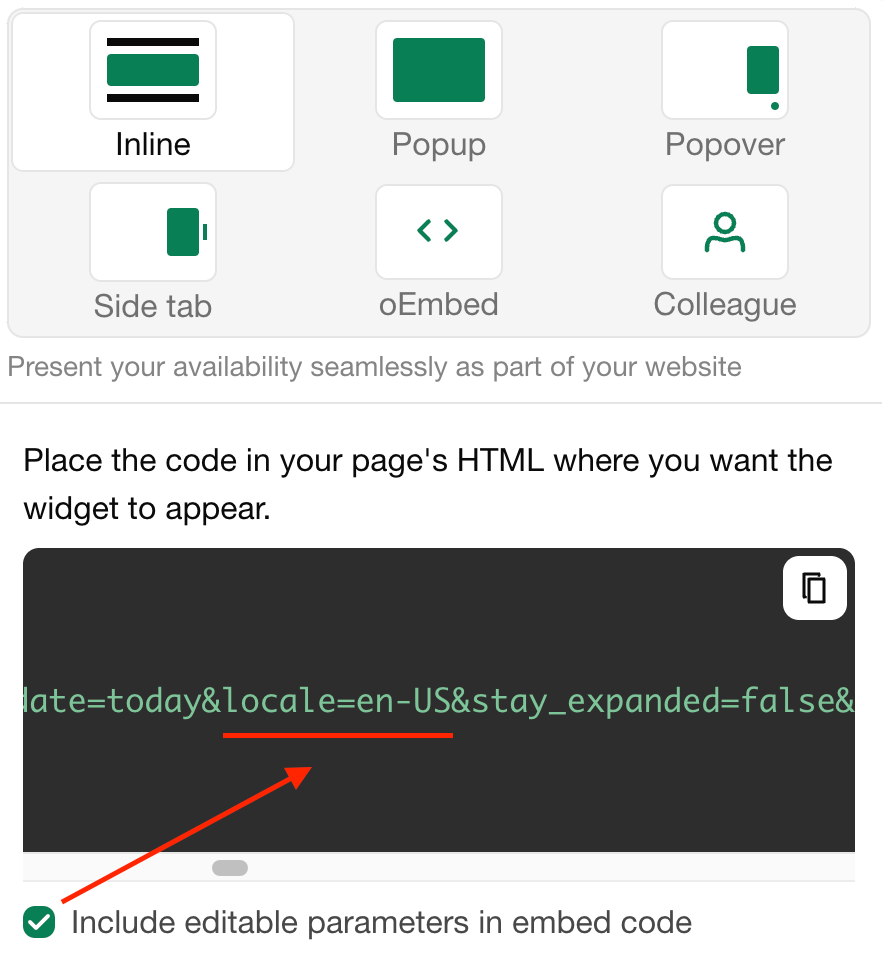
These languages are available:
be-BYベラルーシ語bg-BGブルガリア語cs-CZチェコ語da-DKデンマーク語de-DEドイツ語en-GBイギリス英語en-NZ英語 (ニュージーランド)en-USアメリカ英語es-ESスペイン語eu-ESバスク語fr-FRフランス語gr-ELΕλληνικάhe-ILヘブライ語hr-HRクロアチア語hu-HUハンガリー語it-ITイタリア語ja-JP日本語lt-LTリトアニア語lv-LVラトビア語nl-NLオランダ語nn-NOノルウェー語(ニーノシュク)pl-PLポーランド語pt-BRポルトガル語ro-ROルーマニア語ru-RUロシア語sk-SKスロバキア語sl-SIスロベニア語sr-Cyrlセルビア語 (キリル文字)sr-Latnセルビア語 (ラテン文字)sv-SEスウェーデン語tr-TRトルコ語uk-UAウクライナ語
The names and descriptions of your units, booking form fields and other texts you wrote yourself are translated under Translations.
最終更新日:2026年11月3日