Your account
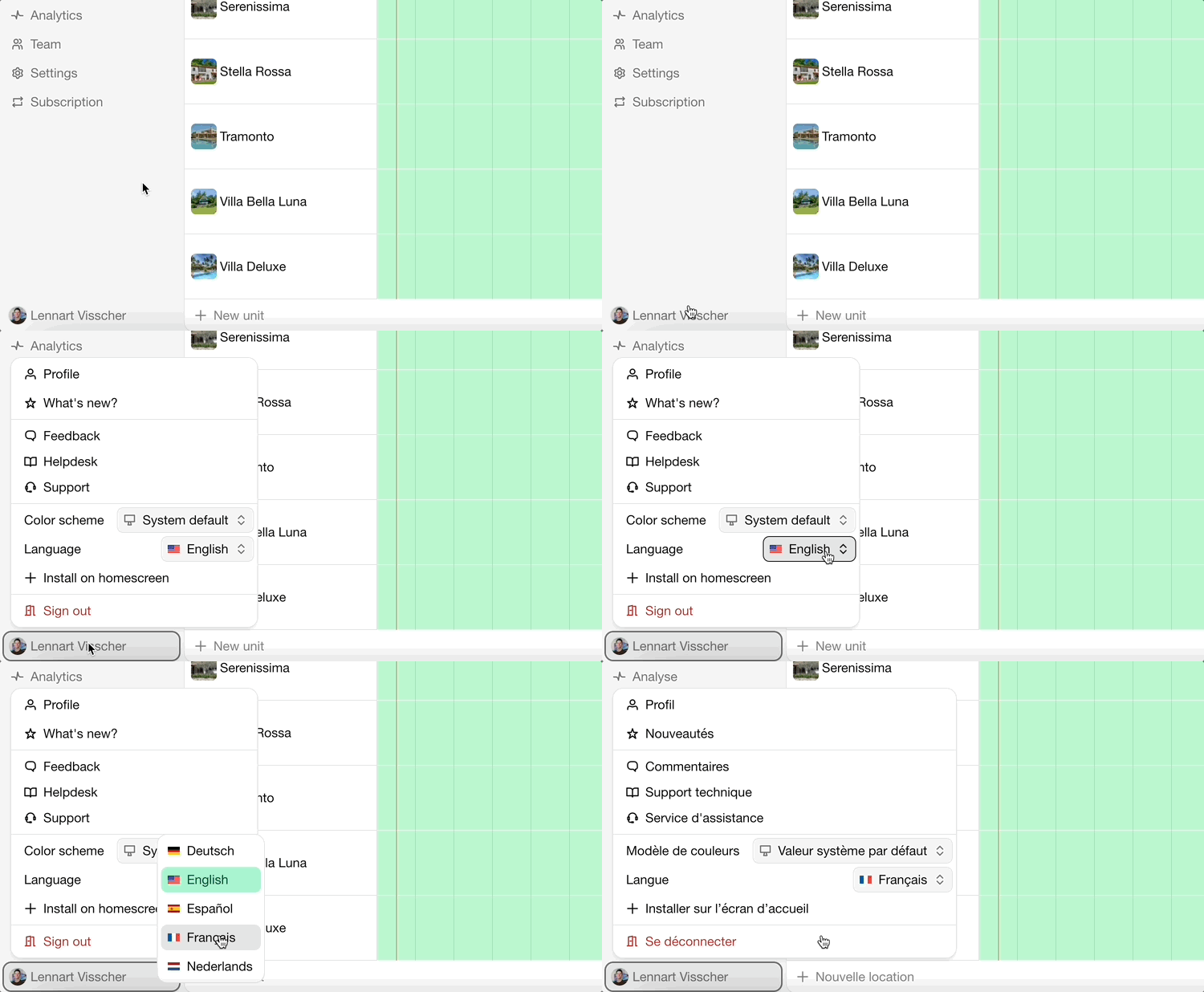
Your account is personal: it's how you sign in, and it can be a member of several organizations. Open the profile menu at the bottom of the side navigation to change your settings.
Profile
Go to the profile menu › Profile. Here you can change:
Your name and Profile picture.
Display language: the language of the admin panel. This doesn't change the language of your widgets or website; see Languages.
Color scheme: light, dark or the setting of your device.
Week starts on: the first day of the week in calendars in the admin panel. Widgets and websites have their own Week starts on setting.
You can also switch the Language and Color scheme directly from the profile menu.
Bookingmood is available in these languages:
be-BYベラルーシ語bg-BGブルガリア語cs-CZチェコ語da-DKデンマーク語de-DEドイツ語en-GBイギリス英語en-NZ英語 (ニュージーランド)en-USアメリカ英語es-ESスペイン語eu-ESバスク語fr-FRフランス語gr-ELΕλληνικάhe-ILヘブライ語hr-HRクロアチア語hu-HUハンガリー語it-ITイタリア語ja-JP日本語lt-LTリトアニア語lv-LVラトビア語nl-NLオランダ語nn-NOノルウェー語(ニーノシュク)pl-PLポーランド語pt-BRポルトガル語ro-ROルーマニア語ru-RUロシア語sk-SKスロバキア語sl-SIスロベニア語sr-Cyrlセルビア語 (キリル文字)sr-Latnセルビア語 (ラテン文字)sv-SEスウェーデン語tr-TRトルコ語uk-UAウクライナ語
Sign-in and security
Go to the profile menu › Authentication.
Email address: used to sign in and to contact you. After changing it, confirm the change from both your old and your new inbox.
New password: enter a safe, unique password.
Phone number: used for SMS notifications. Enter it in international format, for example +31 6 12345678.
Passkeys: sign in with your device's fingerprint, face recognition or PIN instead of a password.
Multi-factor authentication: add an Authenticator app (scan the QR code, then enter the code it shows) so signing in requires a second step.
Forgot your password?
Go to the sign-in page.
Click Forgot your password? and enter your email address.
Click Send one-time password.
Enter the one-time password from the email.
Notifications
Which emails and messages you receive is set per account, under profile menu › Notifications. See Notifications.
Delete your account
Cancel the subscriptions of organizations you own, see Cancellation.
Go to the profile menu › Profile.
Click Delete account and confirm. This can't be undone.
最終更新日:2026年11月3日