Message variables
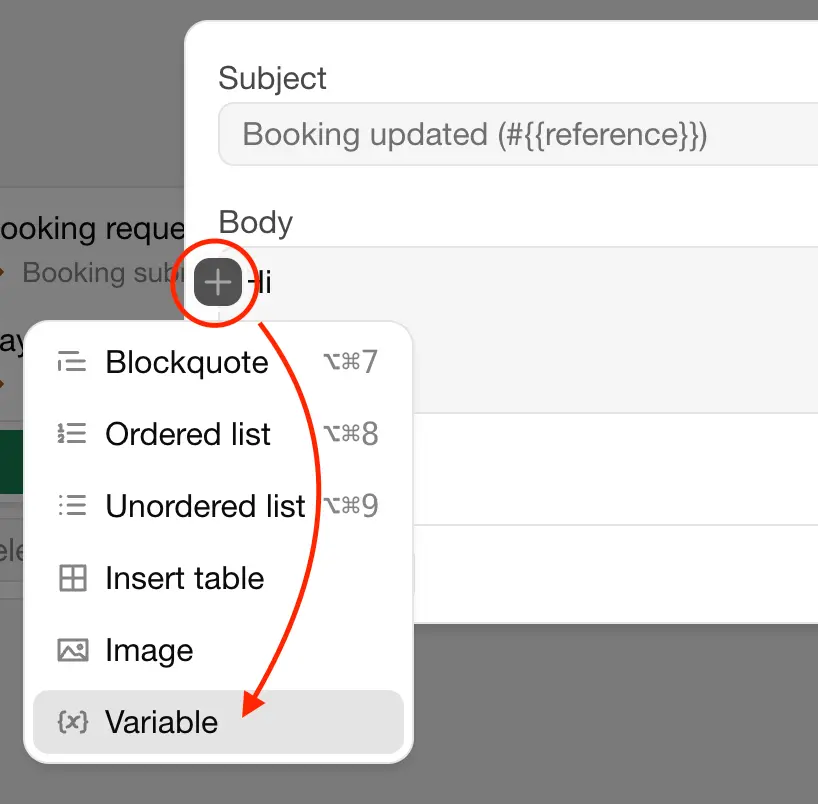
Variables are placeholders in a message that are replaced with the details of the booking when it's sent. For example, {{arrival_date}} becomes the arrival date of the booking. Add a variable with the + button in the message editor.
All messages
{{address}}{{arrival_date}}{{departure_date}}{{duration}}{{email}}{{first_name}}{{guest_url}}{{last_name}}{{name}}{{organization_name}}{{phone}}{{product_name}}{{reference}}{{subtotal}}{{total}}
For each capacity group, {{occupancy_<group>}} is the number of guests in that group, for example {{occupancy_Adults}}.
| Variable | Replaced with |
|---|---|
{{name}}, {{first_name}}, {{last_name}} | The name of the guest |
{{email}}, {{phone}}, {{address}} | The contact details of the guest |
{{arrival_date}}, {{departure_date}}, {{duration}} | The dates of the stay and its length in nights or days |
{{product_name}} | The name of the unit |
{{reference}} | The booking reference |
{{subtotal}}, {{total}} | The subtotal and total price of the booking |
{{guest_url}} | The link to the guest page |
{{organization_name}} | The name of your organization |
Messages about invoices
Messages with the Invoice created from admin trigger can also use:
{{invoice_reference}}{{invoice_date}}{{invoice_total}}
Messages about payments
Messages with the Payment due or Automated payment received trigger can also use:
{{payment_reference}}{{payment_total}}{{payment_paid}}{{payment_due_at}}
Zuletzt geändert 3. November 2026