Özel rezervasyon deneyimleri
Ücretleri ve kısıtlamaları yapılandırın, indirimler ekleyin ve ödemeleri planlayın.
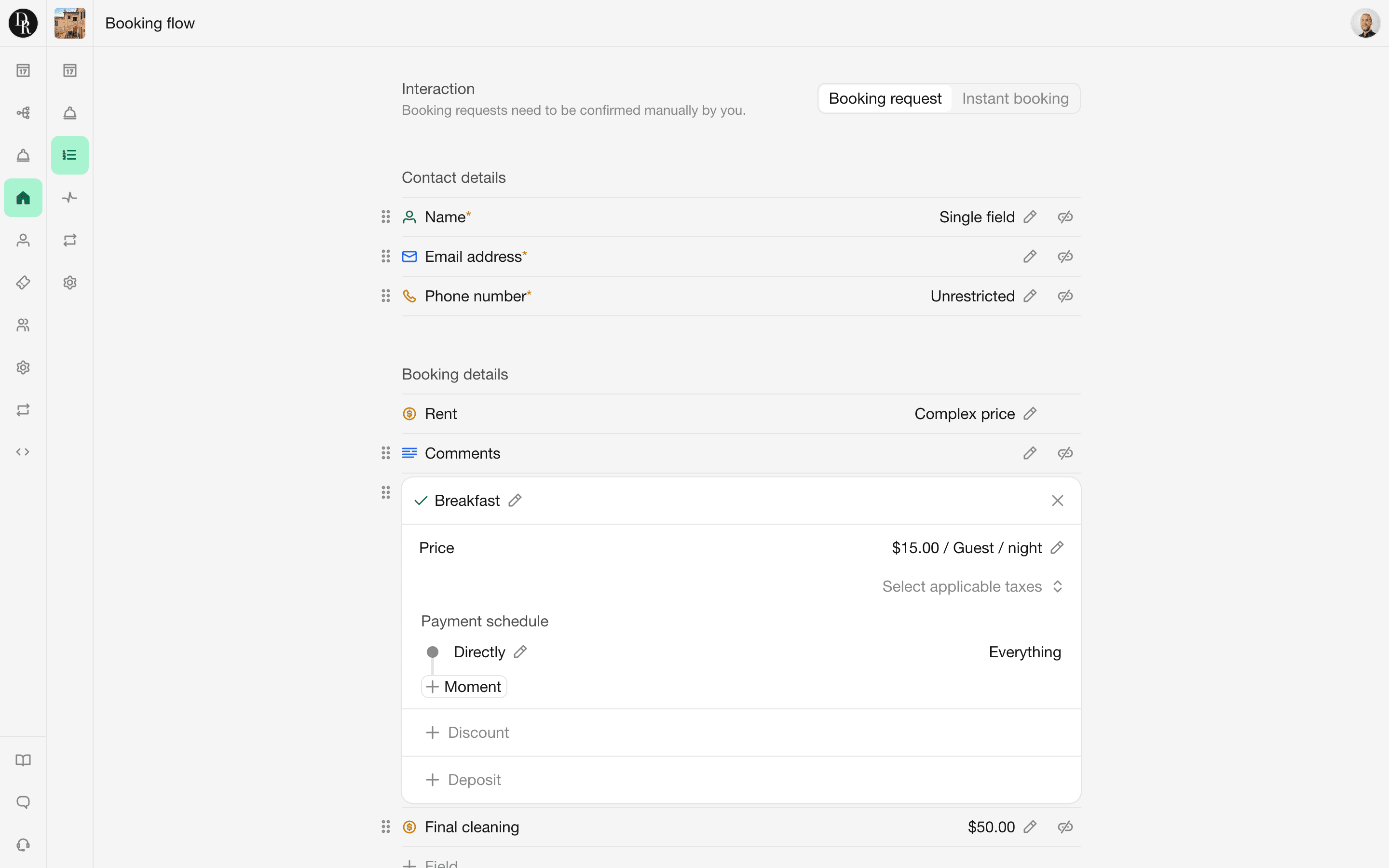
Ücretleri ve kısıtlamaları yapılandırın, indirimler ekleyin ve ödemeleri planlayın.
Choose between booking requests and instant bookings. Opt for booking requests to manually review and communicate with potential guests before confirming or declining. Alternatively, streamline your booking process with instant bookings, automating the entire transaction—guests make the initial payment and the booking is instantly registered in your dashboard.
Craft a custom booking form for each rental unit, collecting essential personal details, ensuring acceptance of terms and conditions, and providing options for add-ons like breakfast or guided tours.

With Bookingmood's customizable price editor, you can configure your rates however you like. Set rates per week or per guest, adjust prices based on seasons, days booked in advance, and more.

Set booking restrictions to align with your preferences. Define fixed arrival and departure days, limit booking duration, specify the number of days guests can book in advance, and more.

Incentivize early or last-minute bookings with discounts, or offer special rates for extended stays. Customize discount conditions and adjust amounts based booking duration, arrival day, season and more.

Surprise acquaintances, reward repeat guests with special discounts or launch marketing campaigns using coupons. Create as many coupons as you like and limit their use according to your preferences.

Flexible payment scheduling allows you to split booking payments into as many parts as needed. Request the initial payment directly after booking and request the remainder two weeks before arrival. You name it.

Bookingmood integrates with Stripe for automated handling and tracking of booking payments. Guest payments are instantly visible within Bookingmood. Stripe provides a wide variety of payment methods and is available in many countries across the globe.
Yes. Each rental unit can have its own booking form containing contact fields, custom questions, optional extras, required fees and taxes.
You can add short text, long text, number, time, checkbox and multiple-choice fields. You can also add a fee or description that does not require an answer from the guest.
Yes. You can attach a file, such as a PDF, to a booking form field. Guests can view and download the attachment while completing the form.
Yes. You can add a price to checkbox or multiple-choice fields. This can be used for optional extras such as breakfast, a baby bed or additional packages.
Yes. You can use the Fee / description field for required charges such as final cleaning or tourist tax. Fees can be calculated per booking, per night, per guest or a combination of these.
Yes. You can create taxes such as VAT, GST or sales tax and apply them to your prices. Taxes can either be included in the displayed price or added on top of it.
Yes. Bookingmood supports online booking payments through Stripe, Square and Mollie. Payments are transferred directly to your connected payment account, and Bookingmood does not charge commission on them. Learn more.
Yes. You can configure when guests need to pay, such as directly after booking, a set number of days before arrival, on arrival or through a combination of payment moments.
No. Payments are received directly through your connected payment provider. Bookingmood is not an intermediary and does not charge commission on booking payments.
Bookingmood integrates with Google Vacation Rentals, HolidayHero, OttoKit, PriceLabs and Zapier. You can also build custom integrations using webhooks and the Bookingmood API. Learn more.
Yes. Bookingmood integrates with PriceLabs, a dynamic pricing platform for holiday rentals and hospitality businesses.
Yes. Bookingmood provides an API that allows developers to access and manage Bookingmood data programmatically. Learn more.
Yes. Webhooks can send real-time event notifications from Bookingmood to another application when something happens in your account. Learn more.
Yes. You can set prices per booking, per night, per week or for a custom period, such as a weekend.
Yes. You can create different prices for different capacity groups or numbers of guests.
Capacity groups let you define the allowed number of guests for different guest types, such as Adults and Children. Each group can have its own minimum and maximum capacity. You can also create a sum group, such as Guests, which automatically adds together the selected capacity groups. This allows you to set limits for individual guest types while also controlling the total number of guests allowed in the unit.
Yes. You can use different prices and booking rules for high season, low season and any other periods you define.
Yes. You can create separate prices for custom periods, such as weekends, or apply different configurations to selected dates.
Yes. You can reduce the price when guests book more than a specified number of nights or days.
Yes. You can add additional fees such as cleaning fees, tourist taxes and other charges to the booking process.
Yes. A refundable deposit can be added to a rate and tracked within the booking. Deposits must be refunded manually after the stay.
Yes. You can specify the minimum and maximum duration guests are allowed to book.
Yes. You can choose on which days of the week guests are allowed to check in or check out.
Yes. You can set one base currency for each rental unit. In your widgets, guests can view prices in other supported currencies, with the amounts automatically converted using current exchange rates.
You can create taxes in Bookingmood and apply them to individual prices. For each tax, you can choose whether it is on top of the price or included in the price. This lets you control how taxes are calculated and displayed for each price.
Bookingmood can be used for almost any type of rentable unit, including vacation homes, apartments, hotel rooms, campsites, boats, vehicles and event venues. Each unit can have its own availability, pricing and settings.
Yes. You can choose a rental period for each unit. Vacation homes can be rented per night, while units such as boats, venues or equipment can be rented per day.
Yes. You can connect main and sub-units, such as an entire property and its individual rooms. Booking one can automatically affect the availability of the related units, helping prevent overlapping bookings.
Yes. You can create coupon codes that give guests a fixed or percentage-based discount. Coupons can be limited to specific rental units, booking dates, stay dates or a maximum number of uses.
Yes. Bookingmood offers a free integration with Google Vacation Rentals. The integration allows your units to appear on Google Vacation Rentals, where guests can discover your accommodation and continue to your Bookingmood booking page to book directly.
Rezervasyon yönetimi
Rezervasyonlarınızı takip edin
İşbirliği
Uygulama içi iletişim, izinler
Misafir iletişimi
Kişisel iletişim ve otomasyonlar
Yerleştirilebilir widget'lar
Mevcut web sitenizde Bookingmood
Web sitesi oluşturucu
Özelleştirilebilir kodsuz web siteleri
Bookingmood’u kullanarak doğrudan rezervasyonlarını artırmak ve misafirleriyle daha sağlam ilişkiler kurmak isteyen 1200’dan fazla bağımsız tatil kiralama işletmesine katılın.