Languages
Widgets are shown in the language you set under Language in the widget's settings. To show one widget in several languages, for example on each language version of your website, set the language in the embed code instead of creating a widget per language.
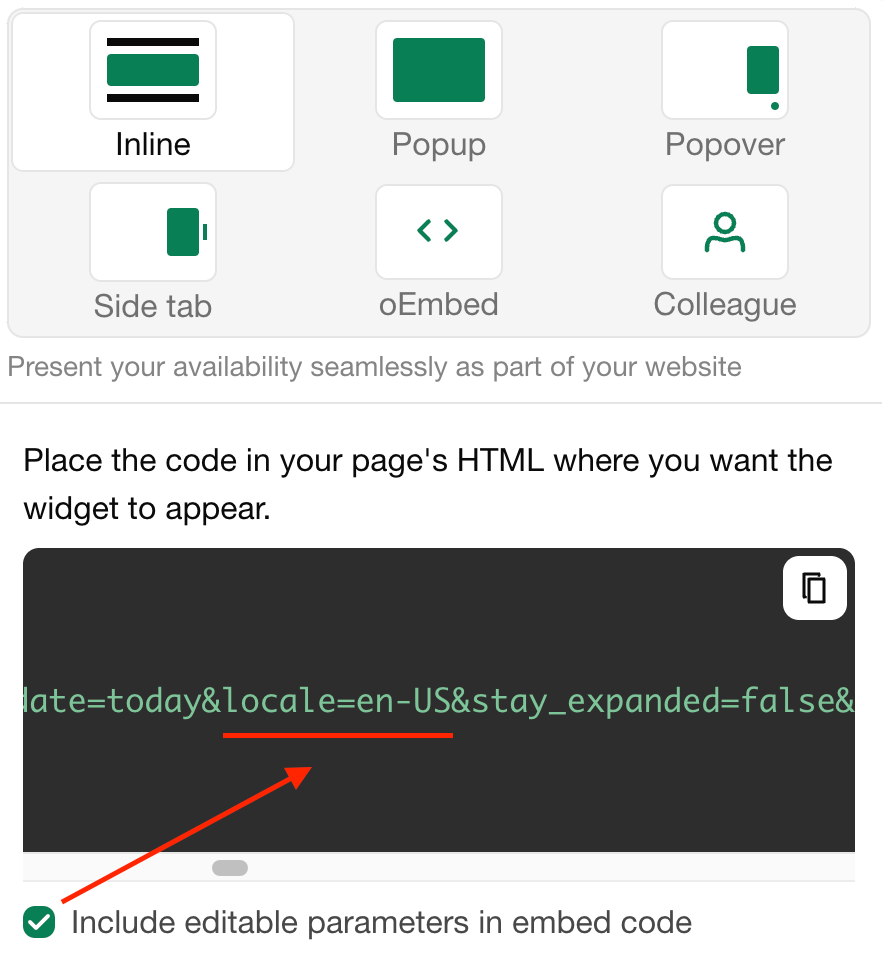
Open the widget under Channels.
Click Embed.
Turn on Include editable parameters in embed code.
Copy the code and change
locale=en-USto the language of the page.
These languages are available:
be-BYбеларускиbg-BGбългарскиcs-CZчешкиda-DKдатскиde-DEнемскиen-GBбритански английскиen-NZанглийски (Нова Зеландия)en-USамерикански английскиes-ESиспанскиeu-ESбаскиfr-FRфренскиgr-ELΕλληνικάhe-ILивритhr-HRхърватскиhu-HUунгарскиit-ITиталианскиja-JPяпонскиlt-LTлитовскиlv-LVлатвийскиnl-NLнидерландскиnn-NOнорвежки (нюношк)pl-PLполскиpt-BRпортугалскиro-ROрумънскиru-RUрускиsk-SKсловашкиsl-SIсловенскиsr-Cyrlсръбски (кирилица)sr-Latnсръбски (латиница)sv-SEшведскиtr-TRтурскиuk-UAукраински
The names and descriptions of your units, booking form fields and other texts you wrote yourself are translated under Translations.
Последна промяна 3 ноември 2026 г.