Languages
Widgets are shown in the language you set under Language in the widget's settings. To show one widget in several languages, for example on each language version of your website, set the language in the embed code instead of creating a widget per language.
Open the widget under Channels.
Click Embed.
Turn on Include editable parameters in embed code.
Copy the code and change
locale=en-USto the language of the page.
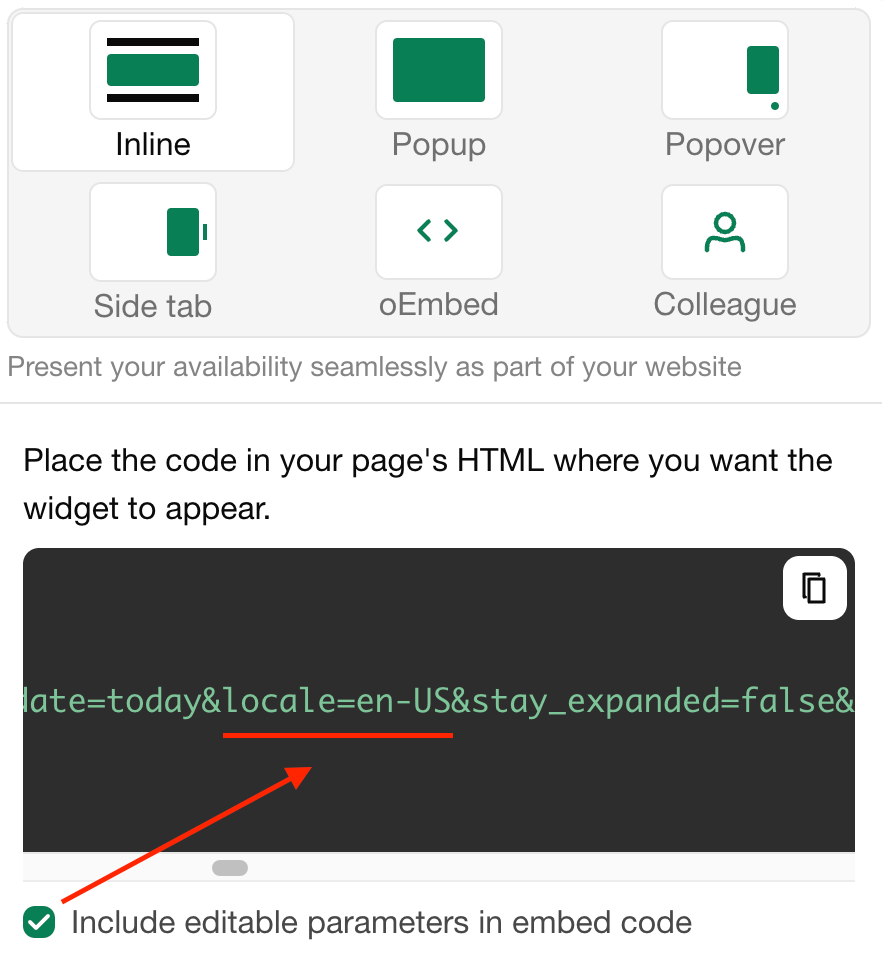
These languages are available:
be-BYбелорускиbg-BGбугарскиcs-CZчешкиda-DKданскиde-DEнемачкиen-GBенглески (Велика Британија)en-NZенглески (Нови Зеланд)en-USенглески (Сједињене Америчке Државе)es-ESшпанскиeu-ESбаскијскиfr-FRфранцускиgr-ELΕλληνικάhe-ILхебрејскиhr-HRхрватскиhu-HUмађарскиit-ITиталијанскиja-JPјапанскиlt-LTлитванскиlv-LVлетонскиnl-NLхоландскиnn-NOнорвешки нинорскpl-PLпољскиpt-BRпортугалскиro-ROрумунскиru-RUрускиsk-SKсловачкиsl-SIсловеначкиsr-Cyrlсрпски (ћирилица)sr-Latnсрпски (латиница)sv-SEшведскиtr-TRтурскиuk-UAукрајински
The names and descriptions of your units, booking form fields and other texts you wrote yourself are translated under Translations.
Последња измена 3. новембар 2026.